
.jpg)

.jpg)
Supports the Backup of Latest Blu-ray Movies
- Kingsman: Secret Service [Blu-ray]
- Transformers: Age of Extinction
- Gravity: Special Edition
- Flight (Two-Disc Combo: Blu-ray / DVD / Digital Copy + UltraViolet)
- Jurassic Park 3D (3D Blu-ray + Blu-ray + DVD + Digital Copy + UltraViolet)
- Masterpiece Classic: Downton Abbey Season 3 [Blu-ray] (Original U.K. Version)
- The Perks of Being a Wallflower [Blu-ray]
- Weeds: Season Eight [Blu-ray]
- Marvel Cinematic Universe: Phase One - Avengers Assembled (10-Disc Limited Edition Six-Movie Collector's Set) [Blu-ray]
- Lincoln (Four Disc Blu-ray / DVD + Digital Copy)
Haven't found your movies to be copied? Actually, Blue-Cloner supports nearly ALL Blu-ray movies.
So please feel free to download Blue-Cloner and have a try, and you'll get satisfied with the perfect backup.
Release
Blue-Cloner 2024 V13.70.863
Jan.14, 2025
- Supported the newest released movies.
Blue-Cloner 2024 V13.00.856
Dec.27, 2023
- Revolutionized Interface UI
- Optimized External Drive Compatibility
- Enhanced Burning Engine
- Support for the Latest Blu-ray Movies
- Critical Bug Fixes
Blue-Cloner 2020 V11.00.843
Jan.07, 2022
Optimized the program UI design.
Supported the newest released movies.
Blue-Cloner 2020 V10.20.840
Sep.29, 2021
- Supported the newest released Blu-ray movies.
Blue-Cloner 2020 V10.20.840
Aug.19, 2021
- Supported the newest released Blu-ray movies.
Blue-Cloner 2020 V10.10.839
Apr.15, 2021
- Supported the newest released Blu-ray movies.
Blue-Cloner 2021 V10.00.838
Mar.02, 2021
- Supports Blu-ray/4K UHD Blu-ray movies released in Q4 2020 and Q1 2021.
- Updated UI.
- Third party Blu-ray decryption plug-in OpenCloner Decode widget allows VLC to play encrypted Blu-ray and UHD movies.
- Retain the same HDR10 and Dolby HD audio effect as the original disc while copying 4K UHD Blu-ray movies.
- Some minor improvements.
Blue-Cloner 2020 V9.60.837
Dec.03, 2020
- Supported the newest released Blu-ray movies.
Blue-Cloner 2020 V9.50.836
Sep.19, 2020
- Fixed some bugs about Blu-ray UHD HDR copying.
- Supported more Blu-ray movies.
Blue-Cloner 2020 V9.40.835
Aug.13, 2020
- Supported more new released Blu-ray movies.
Blue-Cloner 2020 V9.30.834
Jun.09, 2020
- Supported more Blu-ray movies.
Blue-Cloner 2020 V9.20.833
Apr.30, 2020
- Supported the newest released Blu-ray movies.
- Added a new plugin: OpenCloner Decode widget.
Blue-Cloner 2020 V9.10.832
Mar.11, 2020
- Supported the newest movies.
Blue-Cloner 2020 V9.00.831
Jan.06, 2020
This is a Blue-Cloner Must-Have version for this New Year! Worth every user to experience. Supporting a richer movie library and innovative functions!
- Supports Blu-ray/4K UHD Blu-ray movies released in Q4 2019.
- Added the function of customizing audio tracks and subtitles when copying Blu-ray to DVD, removing unwanted sections.
- Improved HST feature for saving lots of time of UHD encoding.
- "NVIDIA" and "INTEL QSV" GPUs are supported.
- Select whether to delete temporary files when copy is finished.
- Select whether to cache files to the hard disk when compressing UHD.
Blue-Cloner 2019 V8.70.830
Nov.22, 2019
- Supported new released 4K Ultra HD/Blu-ray/DVD Movies.
- Improved HST feature for saving lots of time of UHD encoding.
- "NVIDIA" and "INTER QSV" GPUs are supported.
Blue-Cloner 2019 V8.60.829
Sep.27, 2019
- Support more new movies
- Fixed some bug
Blue-Cloner 2019 V8.50.827
Aug.27, 2019
- Supported newest released Blu-ray movies.
Blue-Cloner 2019 V8.40.826
Jul.03, 2019
- Fixed some minor bugs of Blu-ray reading.
- Supported latest released movies.
Blue-Cloner 2019 V8.30.825
May.16, 2019
- Supported new released Blu-ray movies.
- Updated decryption modules.
Blue-Cloner 2019 V8.20.824
Apr.03, 2019
- Fixed a few bugs.
- Optimized for new released Blu-ray movies.
Blue-Cloner 2019 V8.10.823
Feb.26, 2019
Blue-Cloner 2019 V8.00.822
Jan.09, 2019

Blue-Cloner 2018 V8.00.822 is Released. Upgrade to the latest version
- Supports Blu-ray/4K UHD Blu-ray movies released in Q4 2018.
- Integrated the 4K UHD Blu-ray copy function, which enables you to copy 4K Ultra HD movies with only one click without any additional charge.
- 5 diverse copy modes for 4K UHD Blu-ray: perfect 1:1 copy, movie complete copy, movie-only copy, split copy and episodic Blu-ray copy.
- Back up 4K UHD Blu-ray to the hard disk as a movie folder or an ISO file.
- Added One-Click option for Blue-Cloner installation.
- Supports more models and brands of Blu-ray drives and burners.
- Select whether to skip bad sectors when reading disc data.
Blue-Cloner 2018 V7.70.821
Dec.21, 2018
- Updated the decryption module.
- Supported new released Blu-ray/DVD/UHD movies.
Blue-Cloner 2018 V7.60.820
Nov.09, 2018
- Optimized the way to find a recorder.
- Fixed a bug that some players could not play after the generated ISO file was burned.
Blue-Cloner 2018 V7.60.819
Nov.02, 2018
- Optimized for PS3/PS4.
- Enhanced HST stability.
- Optimized UI for 4K resolution.
Blue-Cloner 2018 V7.60.818
Oct.15, 2018
- Fixed bug some BD+ could not be cracked.
- Fixed bug where burning some BD-RE failed
- Improved the function of jumping bad DVD sector.
Blue-Cloner 2018 V7.50.817
Sep.04, 2018
- Supported more new released Blu-ray movies
- Fixed some bugs
Blue-Cloner 2018 V7.40.816
Aug.16, 2018
- Optimized for summer movies released in Aug, 2018.
Blue-Cloner 2018 V7.40.815
Aug.03, 2018
- Fixed some bug.
- Optimized UHD decryption module.
Blue-Cloner 2018 V7.40.814
Jul.27, 2018
- Optimized function of building ISO file.
- Updated decryption module.
Blue-Cloner 2018 V7.40.813
Jul.24, 2018
- Optimized for the latest Blu-ray/DVD/UHD.
- Fixed some bug.
Blue-Cloner 2018 V7.40 build 812
Jul.20, 2018
- Blue-Cloner began to fully support UHD Blu-ray Copy .
- From Blue-Cloner 7.40, you can use Blue-Cloner to copy and backup 4K, HDR, UHD Blu-ray movies.(UHD friendly drive is required.)
- How to copy an UHD Blu-ray movie?
Blue-Cloner 2018 V7.30 Build 811
Jun.28, 2018
- updated decrypt blu-ray module.
Blue-Cloner 2018 V7.30 Build 810
Jun.25, 2018
- Updated decryption module.
- Decrease probability of failed burning.
- Fixed some bugs.
Blue-Cloner 2018 V7.20 Build 808
May.15, 2018
- Updated the decryption module to support latest Blu-ray movie discs.
Blue-Cloner 2018 V7.20 Build 806
May.10, 2018
Blue-Cloner 2018 V7.20 Build 806 is Released.
- Fixed the bug of some BD+ decryption.
- Fixed the bug of disc reading failed.
Blue-Cloner 2018 V7.10 Build 804
Apr.09, 2018
Blue-Cloner 2018 V7.10 Build 804 is Released.
- Fixed the bug of erasing DVD+RW failed.
- Updated the function of decrypting AACS.
Blue-Cloner 2018 V7.00 Build 803
Mar.14, 2018
Blue-Cloner 2018 V7.00 Build 803 is Released.
- Updated Blu-ray AACS decryption function.
- Supports more models and brands of Blu-ray drives and burners.
- Supports latest Blu-ray movies.
Blue-Cloner 2018 V7.00
Feb.23, 2018
Blue-Cloner 2018 V7.00 is officially released.
- Adopts AMD Accelerated Video Transcoding Technology, which greatly improved the copy speed and picture quality.
- Removes Cinavia watermarks planted in audio tracks of a Blu-ray movie, so that you can enjoy the copied discs on playback devices that are equipped with Cinavia detectors such as PS3.
- The latest version, with integrated and reasonable interface layout, makes your copy work more convenient and efficient.
- Use Blue-Cloner 7 days for free before purchasing.
- Directly use the feedback function within the software and send mails to us if you have any questions or suggestions about Blue-Cloner.
- Modified the saving mode of log files. Logs will be cleared at a maximum of 2M and will no longer be deleted after restart.
- Upgraded the registration module.

Blue-Cloner V6.90
Feb. 21, 2017
Blue-Cloner V6.90 is officially released.
- Improved the function of finding the main title in some movie discs.
- Optimized the decryption algorithm, and supports latest Blu-ray movies.
- Improved the function of HST acceleration on some PCs.
- Improved the function of splitting a Blu-ray movie.
Blue-Cloner V6.80
Nov. 14, 2016
Blue-Cloner V6.80 is officially released.
- Supports latest Blu-ray movies.
- Upgraded the decryption library, which makes Blu-ray decryption faster and more stable.
Blue-Cloner V6.70
Jun. 21, 2016
Blue-Cloner V6.70 is officially released.
- Supports more new latest Blu-ray movies.
Blue-Cloner V6.60
May 27, 2016
Blue-Cloner V6.60 is officially released.
- Supports latest Blu-ray movies.
- Fixed the problem that the movies burnt from Blu-ray converted ISO image files can't be played back.
Blue-Cloner V6.50
Mar. 3, 2016
Blue-Cloner V6.50 is officially released.
- Enhanced the H.264 decoding function.
Blue-Cloner V6.40
Jan. 21, 2016
Blue-Cloner V6.40 is officially released.
- Supports latest Blu-ray movies.
Blue-Cloner V6.30
Dec. 24, 2015
Blue-Cloner V6.30 is officially released.
- Supports latest Blu-ray movies released during Christmas and New Year.
- Optimized the reading speed.
Blue-Cloner V6.20
Oct. 13, 2015
Blue-Cloner V6.20 is officially released.
- Supports more new Blu-ray movies.
Blue-Cloner 6.10
Sep 28, 2015
Blue-Cloner 6.10 is officially released.
- The improved interface enables both new and professional users to view all Blu-ray copy features at a glance.
- Supports all regions (A, B, C).
- There is no need to install a third party driver, since internal UDF 2.50 parser is included to read Blu-ray.
- Supports for making a perfect 1:1 copy of the original 3D Blu-ray discs.
- Enjoy your original Blu-ray movie directly with Blue-Cloner and don't need to install other Blu-ray player software.
- Copies home-made Blu-ray discs, backs up home-made Blu-ray folders/ISO files to BD-R/RE with various Blu-ray copy modes.
- Set the DVD encoding format, PAL or NTSC.
- Supports the acceleration of latest graphics cards with higher H.264 encoding speed.
- Do you want to rip high-volume Blu-ray movies to normal video formats on your media devices for playback? Please click here to download the trial version of Blue-Cloner Diamond for free which contains Blue-Cloner, Open Blu-ray ripper and Open SmartBurner to realize your digital dreams. For more information about Blue-Cloner Diamond, please go to https://www.blue-cloner.com/blue-cloner-diamond.html
If you are a registered user of Blue-Cloner 5 or its former versions, please click here to upgrade to Blue-Cloner Diamond. - Compatible with Windows 10 and Windows 8.1.

Blue-Cloner V5.70
Mar. 26, 2015
Blue-Cloner V5.70 is officially released.
- Supports the acceleration of latest graphics cards with higher H.264 encoding speed.
- Supports latest Blu-ray movies.
Blue-Cloner V5.60
Dec. 18, 2014
Blue-Cloner V5.60 is officially released.
- Supports latest Blu-ray movies.
- Added the function of auto-download.
Blue-Cloner V5.50
Nov. 5, 2014
Blue-Cloner V5.50 is officially released.
- Supports latest Blu-ray movies.
- Optimized the transcoding efficiency.
Open SuperConverter V1.10
Oct. 20, 2014
Open SuperConverter V1.10 is officially released.
- Supports multiple input and output video and audio formats.
- Transfer the converted files to iPhone, iPad, iPod, Android Pad, Apple TV, Xbox 360, Mobile Phone, GPhone, PSP, PS3, BlackBerry, Sony, Archos, Windows Phone, HTC mobile, Motorola mobile, Sony mobile and other media devices.
- The intuitive interfaces make the video conversion quite easy and convenient.
- Converts 2D movies into 3D format and converts 3D movies from one format to another.
- Converts video files to the output profile you specified in batches and automatically shuts down the computer after the conversion is finished.
- Clips your favorite sections of a video by setting the starting and ending time.
- Crops the picture frame.
- Rotates vertically/horizontally oriented videos with a single click.
- Customize the video/audio parameters by adjusting the video/audio codec, bitrate, video size, aspect ratio, audio sample, channels, volume, etc.
- Preset the profile parameters for any media device.
Blue-Cloner V5.40
Sep. 28, 2014
Blue-Cloner V5.40 is officially released.
- Supports latest Blu-ray movies.
- Updated the burn engine, and burns Blu-ray movies much faster.
Blue-Cloner V5.30
Aug. 11, 2014
Blue-Cloner V5.30 is officially released.
- Supports latest Blu-ray movies.
- Enhanced the function of converting Blu-ray movies to ISO files.
OpenCloner UltraBox V1.10
Aug. 4, 2014
OpenCloner UltraBox V1.10 is officially released.
- OpenCloner UltraBox is versatile bundled software containing Blue-Cloner, Open Blu-ray ripper, DVD-Cloner, Open DVD ripper, Open SmartBurner and Stream-Cloner.
- The bundled programs will be all registered for ordering OpenCloner UltraBox.
- Get the software version and main features on their product interfaces.
- Operate them on OpenCloner UltraBox's main interface whenever you want without downloading again.

Blue-Cloner V5.20
Jun. 18, 2014
Blue-Cloner V5.20 is officially released.
- Supports latest Blu-ray movies.
- Optimized the copy speed.
Blue-Cloner V5.10
May 28, 2014
Blue-Cloner V5.10 is officially released.
- Enhanced the function of copying 3D Blu-ray movies.
- Supports latest Blu-ray movies.
Blue-Cloner 5
Apr. 28, 2014
Blue-Cloner 5 is officially released.
- Brand-new Express interface and Expert interface: The Express interface is for novices to copy Blu-ray movies with just one click and the Expert interface is for advanced users to copy Blu-ray movies with various customized copy modes.
- Operates Blue-Cloner 5 very quickly and skillfully for anyone.
- Removes protections of AACS, BD+, the latest version of MKB and region code without any third party plug-in, so as to copy and back up Blu-ray discs with no limit.
- Compresses the main movie with MPEG-2 or H.264 1080p to a BD-R/RE (25G).
- Customized copy - Select only your desired movie title(s) to copy and remove the unwanted audio track(s) and subtitle(s) for every selected movie title.
- Copies a Blu-ray movie to a DVD-5 or DVD-9 disc to save your valuable Blu-ray disc.
- Copies a Blu-ray movie to an AVCHD DVD-5 or AVCHD DVD-9 disc to keep relatively high video/audio quality while preserving your original disc.
- Supports the acceleration of CUDA and DXVA 2.
- Supports the acceleration of NVIDIA and AMD display cards.
- Makes multiple Blu-ray copies within one entire Blu-ray copy process.
- Set the target DVD-5/DVD-9 disc size to save space.

Blue-Cloner Diamond
Apr. 28, 2014
Blue-Cloner Diamond is officially released.
Blue-Cloner Diamond is powerful Blu-ray copy/burn/decryption/conversion software. It has all the features of Blue-Cloner plus the ability to burn data/video files to DVD or Blu-ray discs and rip Blu-ray movies to various video and audio formats for enjoying on popular media devices. It enables you to copy Blu-ray movies to blank Blu-ray/DVD discs or to the hard disk and convert 2D movies to 3D format. Besides, you can convert video files to DVD/Blu-ray video format for playback on various DVD/Blu-ray players. Give it a try and you'll find your ideal multimedia solution!

Blue-Cloner V4.70
Jan. 2, 2014
Blue-Cloner V4.70 is officially released.
- Supports latest Blu-ray movies released during Christmas.
- Optimized the info prompts for users, and enables the program to run smoothly.
Blue-Cloner V4.60
Nov. 22, 2013
Blue-Cloner V4.60 is officially released.
- Enhanced the support for BD+ movies.
- Supports latest Blu-ray movies released during Thanksgiving.
Blue-Cloner V4.50
Oct. 17, 2013
Blue-Cloner V4.50 is officially released.
- Upgraded the burn engine and burns Blu-ray movies more smoothly.
- Supports more latest Blu-ray movies.
Blue-Cloner V4.40
Sep. 9, 2013
Blue-Cloner V4.40 is officially released.
- Upgraded the decryption module.
- Supports latest Blu-ray movies.
- Updated the burn engine, and copies Blu-ray movies much faster.
Blue-Cloner V4.30
Jul. 22, 2013
Blue-Cloner V4.30 is officially released.
- Supports latest Blu-ray movies.
- Optimized the burn speed.
Blue-Cloner V4.20
May 23, 2013
Blue-Cloner V4.20 is officially released.
- Updated the decryption module and supports more latest Blu-ray movies.
- Optimized the encoding speed and improved the operating efficiency.
Blue-Cloner V4.10
Mar. 13, 2013
Blue-Cloner V4.10 is officially released.
- Supports Blu-ray movies released in March, 2013.
- Better supports for BD+ decryption.
Blue-Cloner 4
Jan. 28, 2013
Blue-Cloner 4 is officially released.
- The brand-new interfaces make the Blu-ray copy much easier than before.
- Select your desired title(s), audio track(s) and subtitle(s) to copy under the customized copy mode.
- Copies 3D Blu-ray movies.
- Copies Blu-ray discs encrypted with the latest MKB version and bus protections, BD-Live and UOPs without any third party plug-in.
- Supports both NTSC and PAL Blu-ray discs.
- Compatible with most Blu-ray discs, such as BD-R, BD-RE, BD-R DL and BD-RE DL.
- Largely increases the copy speed by using multiple CPUs and the NVIDIA CUDA technology.
- Converts the Blu-ray folder from the hard disk to an ISO file.
- Converts an ISO file to a Blu-ray folder.
- Converts the HD AC3, DTS audio to a normal format to save your valuable Blu-ray disc.
- Compatible with Windows 8, 7, Vista and XP.

Blue-Cloner V3.60
Nov. 28, 2012
Blue-Cloner V3.60 is officially released.
- Supports latest Blu-ray movies.
- Optimized the "movie-only" copy function.
Blue-Cloner V3.50
Sep. 18, 2012
Blue-Cloner V3.50 is officially released.
- Supports latest Blu-ray movies.
- Enhanced the function of creating ISO files from Blu-ray discs.
Blue-Cloner V3.40
Jul. 24, 2012
Blue-Cloner V3.40 is officially released.
- Supports for more up-to-date Blu-ray movies.
- Better supports for 3D movies.
- Enhanced the support for Blu-ray players.
Blue-Cloner V3.30
May 17, 2012
Blue-Cloner V3.30 is officially released.
- Enhanced the ability to remove the AACS encryption.
- Supports for latest BD+ decryption.
- Supports latest Blu-ray movies.
Blue-Cloner V3.20
Apr. 25, 2012
Blue-Cloner V3.20 is officially released.
- Supports more Blu-ray burners.
- Copies 3D Blu-ray movies.
Blue-Cloner V3.10
Feb. 17, 2012
Blue-Cloner V3.10 is officially released.
- Optimized the H.264 encoding, and makes the playback smoother.
- Supports more kinds of ISO files.
- Enhanced the compatibility with Blu-ray players.
Blue-Cloner 3
Jan. 16, 2012
Blue-Cloner 3 is officially released.
- Perfect 1:1 Blu-ray copy
- The optimized H.264 encoding format makes Blu-ray copy more than twice faster than before.
- The customized copy mode enables you to make Blu-ray backups according to your preferences.
- Supports for the decoding function for AMD video cards.
- Supports for the encoding and decoding function for NVIDIA video cards to speed up the Blu-ray copy.
- Burns ISO files from the hard disk to Blu-ray discs.
- Copies the Blu-ray movies to ISO files.
- Preview the source Blu-ray movie.
- Select whether to keep menus.

Blue-Cloner V2.70
Aug. 19, 2011
Blue-Cloner V2.70 is officially released.
- Updated the encoding module, and enhanced the running speed.
- Supports for more latest Blu-ray movies.
Blue-Cloner V2.60 build 518
Apr. 11, 2011
Blue-Cloner V2.60 build 518 is officially released.
- Optimized analysis function supports latest Blu-ray movies.
Blue-Cloner V2.60
Jan. 20, 2011
Blue-Cloner V2.60 is officially released.
- Updated compression module makes the compression quality better.
- Supports latest Blu-ray movies.
Blue-Cloner V2.50
Sep. 8, 2010
Blue-Cloner V2.50 is officially released.
- Fixed the problem that some Blu-ray discs can't be played back on PS3.
- Added the option "Combine main movie's M2TS files" in the "Setup" window.
Blue-Cloner V2.40
Aug. 4, 2010
Blue-Cloner V2.40 is officially released.
- Optimized the copy speed.
- Supports the latest movies.
Blue-Cloner V2.30
Jun. 18, 2010
Blue-Cloner V2.30 is officially released.
- Fixed the location accuracy of the main Blu-ray movie.
Blue-Cloner V2.20
May 12, 2010
Blue-Cloner V2.20 is officially released.
- Fixed the bug that "read movie info failed" occurs for the copied movie on hard disk when opened with Blue-Cloner.
- Further fixed that "compress video failed" occurs in some movies.
Blue-Cloner V2.10
Mar. 30, 2010
Blue-Cloner V2.10 is officially released.
- Fixed the bug prompt occurring in some movies.
- Fixed the problem that the movie subtitle is asynchronous with audio track.
Blue-Cloner V2.0
Mar. 2, 2010
Blue-Cloner V2.0 is officially released.
- HST™ - Copy fast and effectively! With the advanced HST™, Blue-Cloner 2 can finish the Blu-ray copy within four hours.
- Enhanced burn engine, supports the copy of latest Blu-ray movies.
- Cool and gorgeous interfaces.
- Supports for the backup of scratched Blu-ray movies.
- Works with most Blu-ray players and software players.

Blue-Cloner V1.50
Feb. 1, 2010
Blue-Cloner V1.50 is officially released.
- Added the option of "Keep menus when splitting a Blu-ray movie" in the "Setup" window.
- Added the function of skipping bad sectors. Now the latest version can copy scratched discs.
- Renamed the log file "BC_LOG_FILE.log", so that users can find it more easily.
- Fixed some minor bugs.
Blue-Cloner V1.40
Dec. 16, 2009
Blue-Cloner V1.40 is officially released.
- Added the function of checking the latest version in the "About" window.
- Fixed some minor bugs.
Blue-Cloner V1.30.2
Oct. 22, 2009
Blue-Cloner V1.30.2 is officially released.
- Added support for Windows 7.
Blue-Cloner V1.30
Oct. 15, 2009
Blue-Cloner V1.30 is officially released.
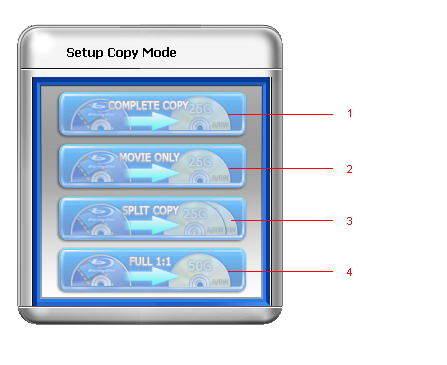
- Movie complete copy
- Compresses a BD-R (50G) to a blank BD-R (25G), including menus and special features.
- Correct and complete copy of a full BD-R (25G) onto another.
- Movie-only copy
- Copies the main movie of the original Blu-ray disc to a blank BD-R (25G), omitting unwanted features like menus, special features and prohibition messages.
- Split copy
- Splits one Blu-ray movie to two blank BD-Rs (25G).
- Perfect 1:1 Blu-ray copy
- Makes a copy of the whole Blu-ray disc onto another, keeping those fancy menus and intros.
- Powerful burn engine, supports the copy of latest Blu-ray movies
Blue-Cloner V1.20
Aug. 27, 2009
Blue-Cloner V1.20 is officially released.
- Enhanced crack function, and supports the burn of latest Blu-ray movies.
- Added the product ID used to register offline.
- Fixed some minor bugs.
Blue-Cloner V1.10
Jul. 8, 2009
Blue-Cloner V1.10 is officially released.
- Full Blu-ray support, including decrypting and burning of Blu-ray movie discs.
- Removes encryptions of BD+ and AACS from Blu-ray discs.
- Copies a Blu-ray movie to a BD-R/RE.
- Movie-only copy - removes unwanted movie features, including subtitles and prohibition messages.
- Supports the selection of audio tracks and subtitles.
- Burns Blu-ray movies on the hard disk to Blu-ray discs.
- Backs up Blu-ray movies to the hard disk.
- Select the encoding format ( MPEG-2 or H.264 ).
- Adjust the compression rate of the special features.
- The size of the target Blu-ray disc can be set.
- Define the length of each chapter.
- Plays back the copied Blu-ray movies on your Blu-ray disc players.
- Playback of the copied Blu-ray discs on the PC with PowerDVD.
- Extremely high conversion speed.
- User-friendly interfaces make the Blu-ray copy simple.

Blue-Cloner 2024 V13.70.863 Released
Jan.14, 2025
- Supported the newest released movies.